CRM Software Data Model: A Complete Guide for Beginners
For businesses in the USA, understanding CRM data models can help teams manage customer information more efficiently, improve reporting, and create better workflows.
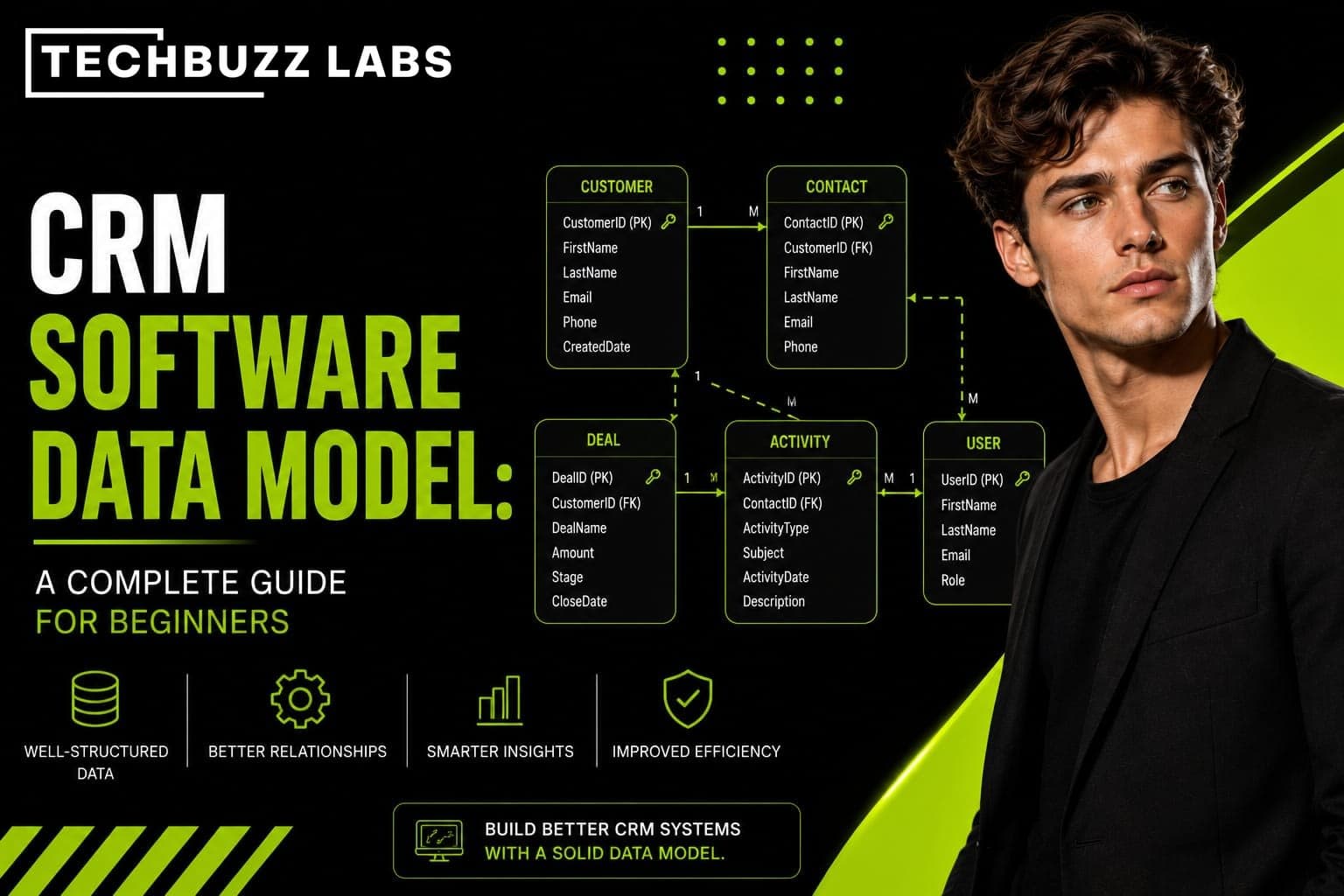
A CRM software data model is the structure that determines how customer, business, sales, and relationship information is organized inside a Customer Relationship Management system.
Modern CRM platforms handle large amounts of information, including customer profiles, companies, leads, sales opportunities, communications, activities, and transactions. Without a well-designed data model, this information can become difficult to organize and use effectively.
At TechBuzzLabs, we understand the growing importance of technology in modern business operations. A strong CRM data model can provide the foundation for businesses that want to organize information, automate processes, and make data-driven decisions.
What Is a CRM Software Data Model?
A CRM software data model is a logical framework that defines how information is stored, organized, and connected within a CRM system.
Think of it as a blueprint for the CRM database. It determines what types of information the system stores, how different records relate to one another, and how users can access that information.
For example, a CRM may store information about a customer, the company they work for, their previous interactions, sales opportunities, and support requests. The data model establishes the relationships between these different pieces of information.
Why Is a CRM Data Model Important?
A well-designed data model helps businesses keep customer information organized and consistent.
Without a clear structure, businesses may encounter duplicate records, incomplete information, inaccurate reports, and difficulty finding important customer details.
A good CRM data model can help organizations:
Organize customer information
Connect related business records
Reduce duplicate data
Improve reporting
Support automation
Make customer information easier to access
Create scalable business workflows
For growing companies, having a structured data model becomes increasingly important as the volume of customer information increases.
Common Components of a CRM Data Model
Although CRM platforms vary, most systems contain several common data components.
Contacts
A contact represents an individual person. Contact records may include names, email addresses, phone numbers, job titles, locations, and communication preferences.
For example, a salesperson may have a contact record for a purchasing manager at a customer company.
Accounts or Companies
An account generally represents a business or organization. An account can be connected to multiple contacts who work for that organization.
This relationship allows sales teams to understand both the company and the individuals associated with it.
Leads
A lead represents a potential customer who has not yet become a qualified sales opportunity.
CRM systems can store information about where the lead came from, their interests, contact details, and engagement history.
Opportunities
An opportunity represents a potential sales deal. It may include information such as expected revenue, sales stage, closing date, products or services involved, and the salesperson responsible for the deal.
Activities
Activities record interactions between businesses and customers. These can include phone calls, emails, meetings, tasks, and other communication.
Tracking activities gives sales teams a better understanding of customer interactions and relationship history.
Relationships Between CRM Records
One of the most important concepts in a CRM data model is the relationship between records.
For example, one company may have multiple contacts. A contact may have multiple activities, while a company may have multiple sales opportunities.
These relationships allow users to move between connected information without maintaining separate records for every interaction.
A simplified relationship might look like:
Company → Contacts → Activities
and:
Company → Opportunities → Sales Activities
These connections make customer information more useful because businesses can see the bigger picture rather than isolated data points.
CRM Data Model and Database Schema
A CRM data model is closely related to a database schema, but the terms are not always identical.
A data model focuses on how information and relationships are logically structured. A database schema describes the specific technical implementation of that structure within a database.
For beginners, it is useful to think of the data model as the conceptual blueprint and the database schema as the technical structure used to implement it.
Both are important when designing or customizing CRM software.
Benefits of a Well-Designed CRM Data Model
A strong CRM data model can provide several business advantages.
Better data organization makes customer information easier to find and manage.
Improved reporting allows businesses to generate more meaningful sales and customer insights.
Automation becomes easier because CRM workflows can use structured data to trigger tasks, notifications, or other processes.
Scalability is another major advantage. A well-designed model can support additional customers, products, employees, and business processes as an organization grows.
Better customer experiences can also result because employees can access relevant customer information more quickly.
Best Practices for Designing a CRM Data Model
Businesses should keep several principles in mind when designing a CRM data model.
First, define the most important business entities and relationships. Determine what information the organization actually needs to store.
Second, avoid unnecessary duplication. Repeating the same information across multiple records can create inconsistencies.
Third, establish clear data standards. Fields such as phone numbers, addresses, industries, and customer statuses should follow consistent formats.
Fourth, consider future growth. A CRM model should be flexible enough to support new products, customers, departments, and workflows.
Finally, consider data security. Different employees may need different levels of access to customer information, so permissions should be incorporated into the overall CRM strategy.
CRM Data Models for Modern Businesses
CRM systems are no longer limited to basic contact management. Modern businesses may use CRM platforms for sales, marketing, customer support, automation, analytics, and other operations.
As businesses connect more applications to their CRM systems, a well-structured data model becomes even more important. Integrations with marketing platforms, payment systems, customer support tools, and analytics applications can create additional data relationships that need to be managed carefully.
For technology-focused businesses, resources such as TechBuzzLabs can help organizations understand how digital solutions are changing business processes and data management.
Conclusion
A CRM software data model provides the foundation for organizing customer and business information within a CRM system. It defines important entities such as contacts, companies, leads, opportunities, and activities while establishing relationships between them.
For businesses in the USA, a well-designed CRM data model can improve data organization, reporting, automation, scalability, and customer relationship management.
Whether a company is implementing its first CRM or improving an existing system, understanding the underlying data model is an important step toward building an efficient and scalable CRM environment. With the right structure and technology strategy, businesses can turn large amounts of customer information into useful insights and better business decisions.